Intro
With advancements in cyber security, many developers have adopted object-relational mapping (ORM) to mitigate SQL injection attacks. While ORM is intended to simplify database interactions and improve security, the threat of injection attacks is still not over. ORM injection occurs when attackers exploit vulnerabilities within ORM frameworks, allowing them to execute arbitrary queries. We will explore advanced ORM injection techniques in this room, providing an in-depth understanding of sophisticated attack vectors and effective mitigation strategies.
By the end of this room, you will gain a comprehensive understanding of various ORM injection methods, which will help you identify and exploit these vulnerabilities to safeguard web applications.
Learning Objectives
Throughout this room, you will gain a comprehensive understanding of the following key concepts:
-
Understanding ORM
-
Identifying Injection
-
Weak Implementation
-
Vulnerable Implementation
object relational mapping
What is ORM
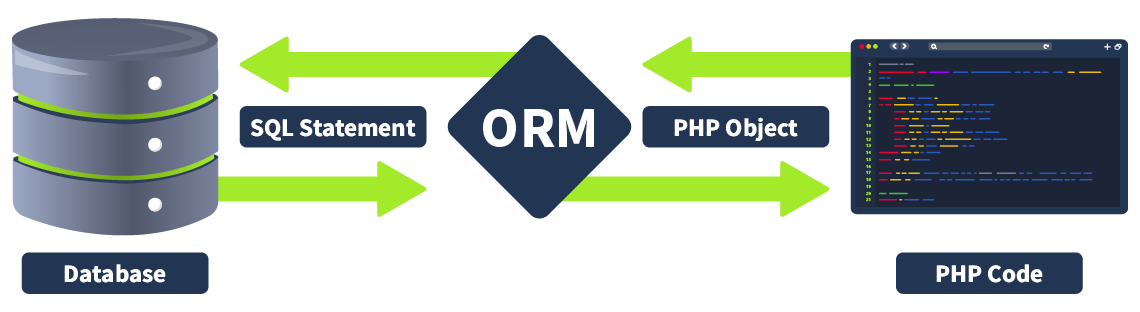
ORM is a programming technique that facilitates data conversion between incompatible systems using object-oriented programming languages. It allows developers to interact with a database using the programming language’s native syntax, making data manipulation more intuitive and reducing the need for extensive SQL queries. ORM is particularly beneficial when complex data interactions are required, as it simplifies database access and promotes code reusability.
Purpose
ORM serves as a bridge between the object-oriented programming model and the relational database model. The primary purpose of an ORM is to abstract the database layer, allowing developers to work with objects rather than tables and rows. This abstraction layer helps in:
- Reducing boilerplate code: ORM reduces the need for repetitive code by automatically generating SQL queries based on object operations.
- Increasing productivity: Developers can focus on the business logic without worrying about database interactions.
- Ensuring consistency: ORM frameworks consistently handle database operations, reducing the risk of errors.
- Enhancing maintainability: Changes to the database schema are easier to manage, as they can be reflected in the object model without extensive code modifications.
Commonly Used ORM Frameworks
Several ORM frameworks are widely used in the development community, each catering to different programming languages and environments. Here are a few examples:
Doctrine (PHP)
Doctrine is a powerful and flexible ORM framework for PHP. It is particularly popular in the Symfony framework but can be used independently. Doctrine provides a comprehensive set of tools for database interactions, including a query builder, schema management, and an object-oriented query language. Its ability to map complex object structures to database schemas makes it a favourite among PHP developers.
Hibernate (Java)
Hibernate is a robust and mature ORM framework for Java applications. It simplifies the mapping of Java classes to database tables and provides powerful data retrieval and manipulation capabilities through its Hibernate Query Language (HQL). Hibernate supports various database management systems and is known for its performance optimisation features, such as caching and lazy loading.
SQLAlchemy (Python)
SQLAlchemy is a versatile and powerful ORM for Python. It offers an SQL toolkit and an ORM system that allows developers to use raw SQL when needed while still providing the benefits of an ORM. SQLAlchemy’s flexibility and modular architecture make it suitable for a wide range of applications, from small scripts to large-scale enterprise systems.
Entity Framework (C#)
Entity Framework is Microsoft’s ORM framework for .NET applications. It enables developers to work with relational data using domain-specific objects, eliminating the need for most data-access code that developers typically need to write. Entity Framework supports a variety of database providers and integrates seamlessly with other .NET technologies.
Active Record (Ruby on Rails)
Active Record is the default ORM for Ruby on Rails applications. It follows the Active Record design pattern, which means that each table in a database corresponds to a class, and each row in the table corresponds to an instance of that class. Active Record simplifies database interactions by providing a rich set of methods for querying and manipulating data.
Mapping Between Objects in Code and Database Tables
ORM is a technique that simplifies data interaction in an application by mapping objects in code to database tables. In PHP, this process involves defining classes that represent database tables and their relationships. Each class property corresponds to a column in the table, and each class instance represents a row.
For instance, using Laravel’s Eloquent ORM, you might define a model class like this:
namespace App\Models; use Illuminate\Database\Eloquent\Model; class User extends Model { protected $table = 'users'; protected $fillable = [ 'name', 'email', 'password', ]; // Other Eloquent model configurations can go here... }
In this example, the User class maps to the users table in the database, with properties corresponding to columns. Eloquent ORM handles the translation between these object representations and the underlying SQL queries, allowing developers to manipulate database records using object-oriented syntax.
Common ORM Operations (Create, Read, Update, Delete)
ORM frameworks streamline common database operations, often referred to as CRUD operations:
- Create: Creating new records in the database involves instantiating a new model object, setting its properties, and saving it to the database.
use App\Models\User; // Create a new user $user = new User(); $user->name = 'Admin'; $user->email = 'admin@example.com'; $user->password = bcrypt('password'); $user->save();
This code creates a new user and saves it to the database. The save method prepares the entity for insertion and executes the SQL INSERT statement to add the new record to the users table. The bcrypt() function is used to securely hash the password before saving it.
- Read: Reading records from the database involves retrieving data using various Eloquent methods.
use App\Models\User; // Find a user by ID $user = User::find(1); // Find all users $allUsers = User::all(); // Find users by specific criteria $admins = User::where('email', 'admin@example.com')->get();
This code demonstrates different ways to retrieve records from the database. The function find(1) retrieves the user with ID 1 by executing a SELECT SQL statement. The function all() retrieves all users by executing a SELECT * FROM users SQL statement. The clause where('email', 'admin@example.com')->get() retrieves users with the specified email by executing a SELECT * FROM users WHERE email = 'admin@example.com' SQL statement.

Similar to the create and read operations, the update and delete functionalities follow a straightforward approach using Laravel’s Eloquent ORM. For updates, you retrieve the existing record, modify its properties, and save the changes. For deletions, you retrieve the record and call the delete method to remove it from the database. Eloquent handles the preparation and execution of the corresponding SQL statements, making database operations simple and intuitive.
Comparing SQL Injection and ORM Injection
SQL injection and ORM injection are both techniques used to exploit vulnerabilities in database interactions, but they target different levels of the stack:
- SQL injection: Targets raw SQL queries, allowing attackers to manipulate SQL statements directly. This is typically achieved by injecting malicious input into query strings. The injection part in the following query,
OR '1'='1, always evaluates to true, allowing attackers to bypass authentication:
SELECT * FROM users WHERE username = 'admin' OR '1'='1';
- ORM injection: Targets the ORM framework, exploiting how it constructs queries from object operations. Attackers manipulate the ORM’s methods and properties to influence the resulting SQL queries.
$userRepository->findBy(['username' => "admin' OR '1'='1"]);
In the above code, the injection part, admin' OR '1'='1, always evaluates to true.
Key Differences in Exploitation Techniques
| Aspect | SQL Injection | ORM Injection |
| Level of injection | Targets raw SQL queries directly | Targets the ORM framework’s query construction |
| Complexity | More straightforward, as it manipulates raw SQL | Requires understanding of ORM internals and methods |
| Detection | Easier to detect with traditional WAFs and query logs | Harder to detect, as payloads are within ORM methods |
| Mitigation | Use of prepared statements, parameterised queries, input validation | Proper ORM configuration, application-level input validation, ORM features enforcing query safety |
Configuring the Environment
Since we are using Laravel in this project, we will briefly explain how to configure Eloquent ORM (Laravel-based). Eloquent ORM is the default ORM included with Laravel, which provides a beautiful, simple Active Record implementation for working with your database. First, we need to install Laravel using Composer. Open your terminal and run the command composer create-project --prefer-dist laravel/laravel thm-project, where thm-project is the name of your project. You don’t have to practice these steps in this room; this is just to help you understand how an ORM facilitates.
Configure Database Credentials
Next, we need to configure our database credentials. Laravel uses the .env file to store environment variables, including database credentials. Open the .env file in the root of your Laravel project and update the following lines with your database details:
DB_CONNECTION=mysql DB_HOST=127.0.0.1 DB_PORT=3306 DB_DATABASE=your_database_name DB_USERNAME=your_database_user DB_PASSWORD=your_database_password
Setting up Migrations
Migrations are like version control for your database, allowing you to easily modify and share the database schema. Laravel’s migration system is an essential part of the framework and simplifies the management of database changes.
Create a Migration
To create a migration, we can use the Artisan command-line tool that comes with Laravel. You can run the command php artisan make:migration create_users_table --create=users to generate a migration for the users table:
This command generates a migration file in the database/migrations directory. The migration file contains methods to define the structure of the users table.
<?php use Illuminate\Database\Migrations\Migration; use Illuminate\Database\Schema\Blueprint; use Illuminate\Support\Facades\Schema; class CreateUsersTable extends Migration { public function up() { Schema::create('users', function (Blueprint $table) { $table->id(); $table->string('name'); $table->string('email')->unique(); $table->string('password'); $table->timestamps(); }); } public function down() { Schema::dropIfExists('users'); } }
In the above code, the up() method defines the structure of the users table. It includes columns for ID, name, email, password, and timestamps. Conversely, the down() method drops the users table if the migration is rolled back.
After defining the migration, run the command php artisan migrate to apply the migration and create the users table in the database. This command will execute the up() method in the migration file and create the users table with the specified columns in your database.
In the context of ORM, migrations simplify the process of mapping database tables to application models. They enable developers to focus on writing clean, maintainable code while ensuring that the underlying database schema supports the application’s data requirements. However, from a red team perspective, improperly configured migrations and weak implementations can lead to vulnerabilities like ORM injection. Hackers often exploit these weaknesses to manipulate database queries and gain unauthorised access to sensitive data. Therefore, it is crucial to use migrations effectively to enforce strong, secure database schema designs and ensure robust ORM configurations to prevent such security flaws.
Identifying ORM injection vulnerabilities involves examining how user inputs are handled within ORM queries. These vulnerabilities typically arise when user inputs are directly embedded into ORM query methods without proper sanitisation or validation. Indicators of potential ORM injection issues include the use of dynamic queries that concatenate user inputs, raw query execution methods, and insufficient use of parameterised queries.
Connecting to the Machine
You can start the virtual machine by clicking the Start Machine button attached to this task. You may access the VM by visiting the link https://LAB_WEB_URL.p.thmlabs.com. Later in the room, we will use a vulnerable application to practically perform the exercise and familiarise ourselves with various attack vectors. Please wait 3-4 minutes after the system boots completely to let the auto scripts run successfully.

Techniques for Testing ORM Injection
- Manual code review: A thorough source code inspection can reveal raw query methods (such as
whereRaw()in Laravel) that incorporate user inputs directly. Look for concatenated strings or unescaped inputs in ORM methods, which can indicate injection points. - Automated scanning: Use security scanning tools that are designed to detect ORM injection vulnerabilities. These tools analyse the codebase to identify patterns that could lead to injection, such as dynamic query construction or improper input handling.
- Input validation testing: Perform manual testing by injecting payloads into application inputs to see if they affect the underlying ORM query. For example, injecting SQL control characters or keywords to determine if they alter the execution of the query.
- Error-based testing: Enter deliberately incorrect or malformed data to trigger errors. Detailed error messages can provide insights into the structure of the underlying queries and indicate potential vulnerabilities.
Frameworks and ORM Injection Testing
| Framework | ORM Library | Common Vulnerable Methods |
| Laravel | Eloquent ORM | whereRaw(), DB::raw() |
| Ruby on Rails | Active Record | where("name = '#{input}'") |
| Django | Django ORM | extra(), raw() |
| Spring | Hibernate | createQuery() with concatenation |
| Node.js | Sequelize | sequelize.query() |
The table above highlights various web development frameworks and their associated ORM libraries, detailing common methods that are prone to vulnerabilities. For example, in Laravel, using whereRaw() or DB::raw() with user inputs can lead to ORM injection, but this can be prevented by using parameterised queries with the where() method. Similarly, in Django, methods like extra() and raw() can introduce vulnerabilities if not handled correctly, while using the filter method with parameterised queries ensures safer database interactions. Understanding these common pitfalls and adopting secure coding practices is crucial for maintaining the security of web applications.
Exploring the Target Application
Now that we know how to identify ORM injection vulnerabilities, let’s visit the site at https://LAB_WEB_URL.p.thmlabs.com. Here, you will see that the site prompts you for input. To determine which framework is being used, we can employ various techniques such as inspecting cookies, viewing the source code, and analysing HTTP headers.
Techniques to Identify the Framework
- Verifying cookies: Examine the cookies set by the application. Frameworks often use unique naming conventions or formats for their session cookies, which can provide clues about the underlying technology.

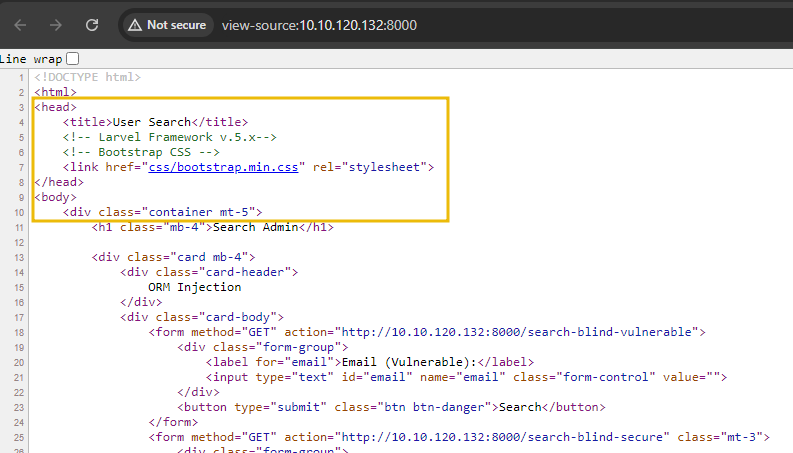
- Reviewing source code: Look through the HTML source code for comments, meta tags, or any embedded scripts that might reveal framework-specific signatures. However, this method may only sometimes be conclusive.
- Analysing HTTP headers: HTTP headers can sometimes contain information about the server and framework. Tools like Burp Suite or browser developer tools can be used to inspect these headers.
- URL structure: The structure of URLs can give hints about the framework. For instance, certain routing patterns are unique to specific frameworks.
- Login and error pages: Authentication pages and error messages can sometimes reveal the framework. Some frameworks have distinctive error pages or login form structures.
Now that we’ve identified that the application uses Laravel by inspecting the cookies, we can dig deeper by supplying malicious input to further explore its behaviour. Specifically, we’ll input 1' to see how the application handles this data and confirm ORM use. When we visit the site at https://LAB_WEB_URL.p.thmlabs.com, we are prompted to provide input. We enter 1' into the Email (Vulnerable) input field and submit the form to determine how the application processes this input. This particular input is designed to disrupt the query structure and reveal any underlying issues with how the application constructs its queries.
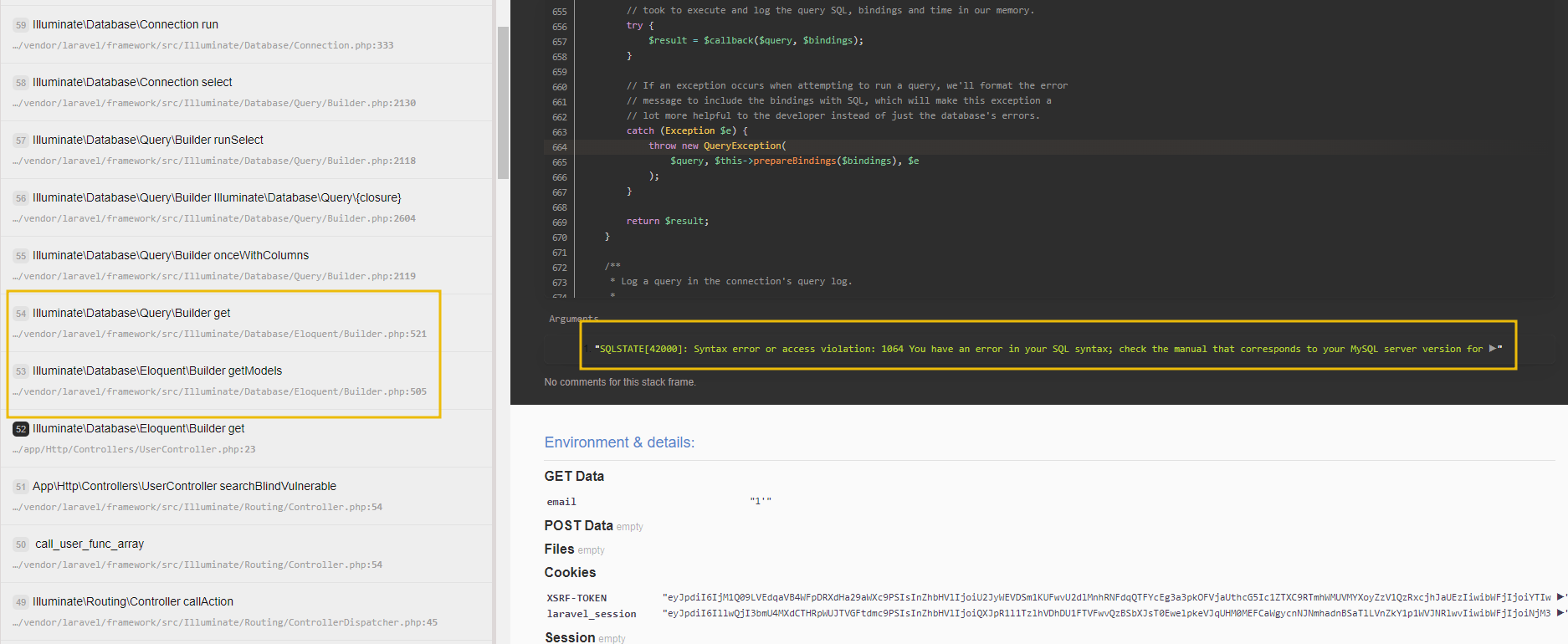
Upon submitting this input, we need to closely observe the application’s response. If the application returns an error message, it can provide valuable insights into the query construction process. For instance, an error message such as SQLSTATE[42000]: Syntax error or access violation indicates that the input has been improperly handled and concatenated into an SQL query, resulting in a syntax error. The output shows that it uses Laravel’s Eloquent ORM, as the error messages and query patterns are characteristic of Eloquent’s query builder.
For red teamers, identifying ORM injection vulnerabilities is critical to assessing an application’s security posture. ORM injection can be exploited if user inputs are not properly sanitised and validated, leading to unauthorised access or manipulation of database queries. Red teamers can uncover these vulnerabilities by employing techniques such as manual code review, automated scanning, and rigorous input validation testing. Using secure coding practices like parameterised queries and robust input validation is essential to mitigating the risks associated with ORM injection. Regular code reviews and the use of security tools can help developers identify and fix these issues.
In this task, we will explore how an attacker can exploit ORM vulnerabilities when the ORM is weakly implemented. To start, revisit the website at https://10-201-49-10.reverse-proxy-us-east-1.tryhackme.com, where we have our two input fields that accept email input.

Let’s take a closer look at the source code used by the developer: to Let’s take a closer look at the source code used by the developer for the Email (Vulnerable) input field:
public function searchBlindVulnerable(Request $request) { $users = []; $email = $request->input('email'); $users = Admins::whereRaw("email = '$email'")->get(); if ($users) { return view('user', ['users' => $users]); } else { return view('user', ['message' => 'User not found']); } }
What This Function Does
The searchBlindVulnerable() function is designed to retrieve user records based on the email parameter provided by the user. Here’s a detailed breakdown of the function:
- Retrieve input: The function captures the
emailparameter from the HTTP request. This is done using the input method of the$requestobject. - Construct query: The function then constructs a raw SQL query using Laravel’s
whereRaw()method, which directly incorporates the email value into the SQL statement. - Execute query: This query is executed, storing the result in the
$usersvariable. - Return view: Finally, the function returns a view. If the
$usersarray is not empty, it passes the user data to the view; otherwise, it passes a “User not found” message.
The critical issue in this function lies in the direct use of whereRaw() with user input. This method of query construction is vulnerable to injection attacks because it does not sanitise the input.
An attacker can exploit this vulnerability by manipulating the email parameter. If an attacker inputs 1' OR '1'='1, the resulting SQL query becomes:
SELECT * FROM users WHERE email = '1' OR '1'='1';
This query will always return all user records because the condition ‘1’=‘1’ is perpetually true.
Detailed Exploitation
- Input malicious value: The attacker visits the input field on the website and enters a crafted input, such as
1' OR '1'='1. - Query construction: The
searchBlindVulnerable()function receives this input and constructs the following query usingwhereRaw():
$users = User::whereRaw("email = '1' OR '1'='1'")->get();
This raw query construction directly inserts the malicious input into the SQL query.
- Query execution: Laravel’s Eloquent ORM translates this into the SQL statement
SELECT * FROM users WHERE email = '1' OR '1'='1';. - Result: Since
'1'='1'is always true, the query returns all records in the user’s table. The attacker now has access to potentially sensitive information about all users in the database as shown below:
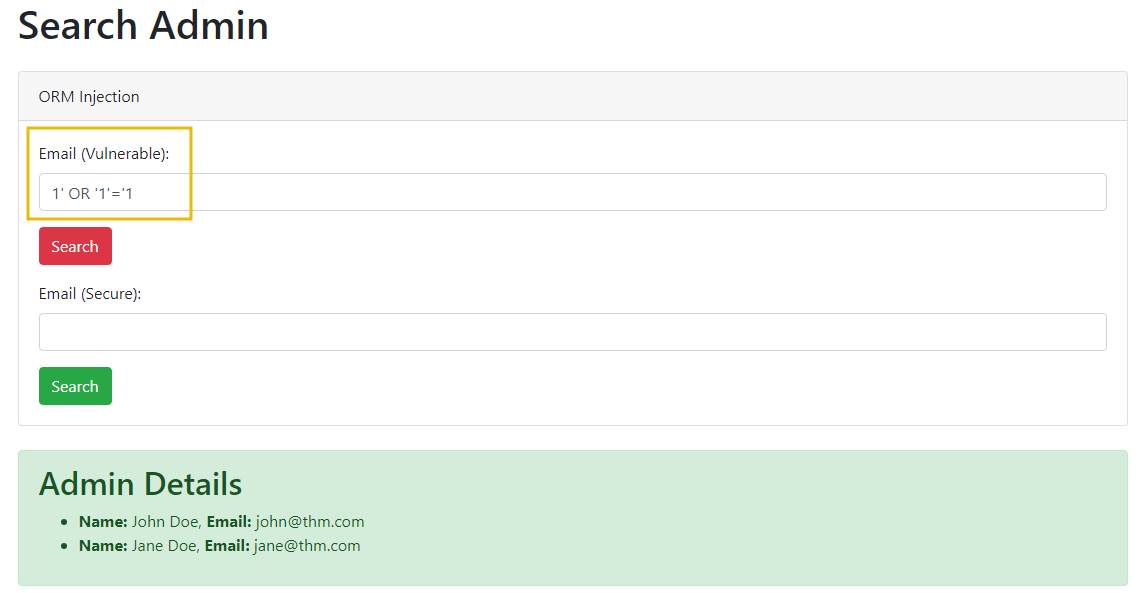
Implementing Secure ORM Queries
Let’s look at a secure version of the query function to demonstrate how secure implementation can protect against ORM injection vulnerabilities. By using parameterised queries, we can ensure that user inputs are properly sanitised, significantly reducing the risk of injection attacks. Here’s a secure implementation of the function via the Email (Secure) input field:
public function searchBlindSecure(Request $request) { $email = $request->input('email'); $users = User::where('email', $email)->get(); if (isset($users) && count($users) > 0) { return view('user', ['users' => $users]); } else { return view('user', ['message' => 'User not found']); } }
Breakdown of Secure Implementation
- Retrieving input: The function captures the email parameter from the HTTP request using the input method of the
$requestobject. This is the same as in the vulnerable version. - Constructing the query securely: Instead of using
whereRaw(), the secure version uses Eloquent’swhere()method. This method automatically escapes the input, thus preventing SQL injection. Thewhere()method constructs a parameterised query behind the scenes, ensuring that user input is not directly included in the SQL statement. - Executing the query: The query is executed, and the result is stored in the
$usersvariable. Because the query is parameterised, the input is sanitised, which means it cannot break the SQL query structure. - Returning the view: Finally, the function returns a view. If the
$usersarray contains data, it passes the user data to the view; otherwise, it shows an error message. This logic ensures that only valid data is processed and displayed.
Now, try using the same malicious payload 1' OR '1'='1 with the secure implementation. Visit the website at https://10-201-49-10.reverse-proxy-us-east-1.tryhackme.com and enter the payload in the Email (Secure) input field. When you submit this input, you will notice that the application does not break or return all user data. Instead, it behaves as expected, either finding no user with that email or returning the appropriate user data if a valid email is provided, as shown below:
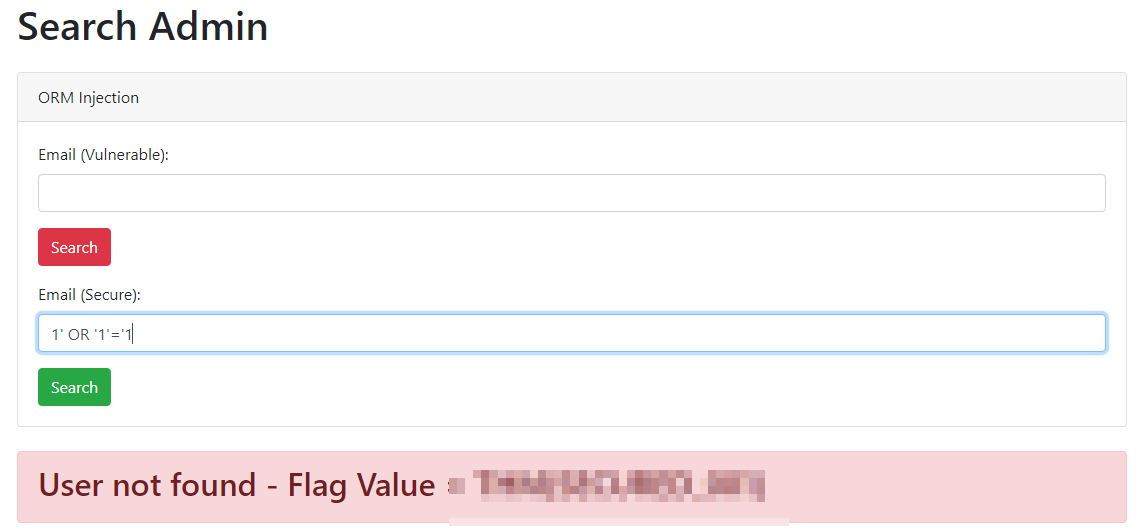
Why This Is Secure
- Parameterised queries: Parameterised queries ensure that the input values are treated as data only, not executable code. This prevents any injected SQL from being executed.
- Automatic escaping: Eloquent automatically escapes the input values, negating any special characters that could be used for SQL injection.
- Consistent query logic: By using Eloquent methods like
where(), the query logic remains consistent and clear, making it easier to maintain and audit for security.
The use of whereRaw() in the function searchBlindVulnerable() demonstrates a weak implementation of ORM, making the application highly susceptible to injection attacks. By understanding how user inputs are directly incorporated into SQL queries, attackers can craft inputs to manipulate the query logic. This highlights the importance of using parameterised queries and proper input validation to secure web applications against such exploits.
While secure coding practices are essential, it is also important to recognise how a developer might inadvertently implement a vulnerable version of an ORM, creating avenues for exploitation. Vulnerable implementations can occur when developers use outdated or misconfigured ORM libraries that contain inherent security flaws. These flaws can be exploited by attackers to manipulate database queries and gain unauthorised access or control. Such vulnerabilities may stem from issues like improper handling of query parameters or inadequate protection against injection attacks within the ORM framework itself. Developers must ensure they are using up-to-date and secure versions of ORM libraries to avoid introducing exploitable vulnerabilities into their applications.
Practical Example
One such example is the Laravel query builder package, which had a significant security vulnerability in versions prior to 1.17.1. This vulnerability allowed SQL injection through unsanitised query parameters. The vulnerability was identified in how the package handled sorting parameters directly from user input without proper validation. We have used the Spatie query builder in this example, which also uses the Laravel query builder internally to make queries.
To demonstrate this vulnerability, you can access the machine at https://10-201-49-10.reverse-proxy-us-east-1.tryhackme.com/query_users?sort=name. This endpoint allows getting the top users sorted by the name column via the sort parameter.

The Laravel equivalent translation of the query is SELECT * FROM users ORDER BY name ASC LIMIT 2.
Injection Attempt
If we try injecting the name parameter with name', we will see that the app returns an error that it couldn’t find the column name.
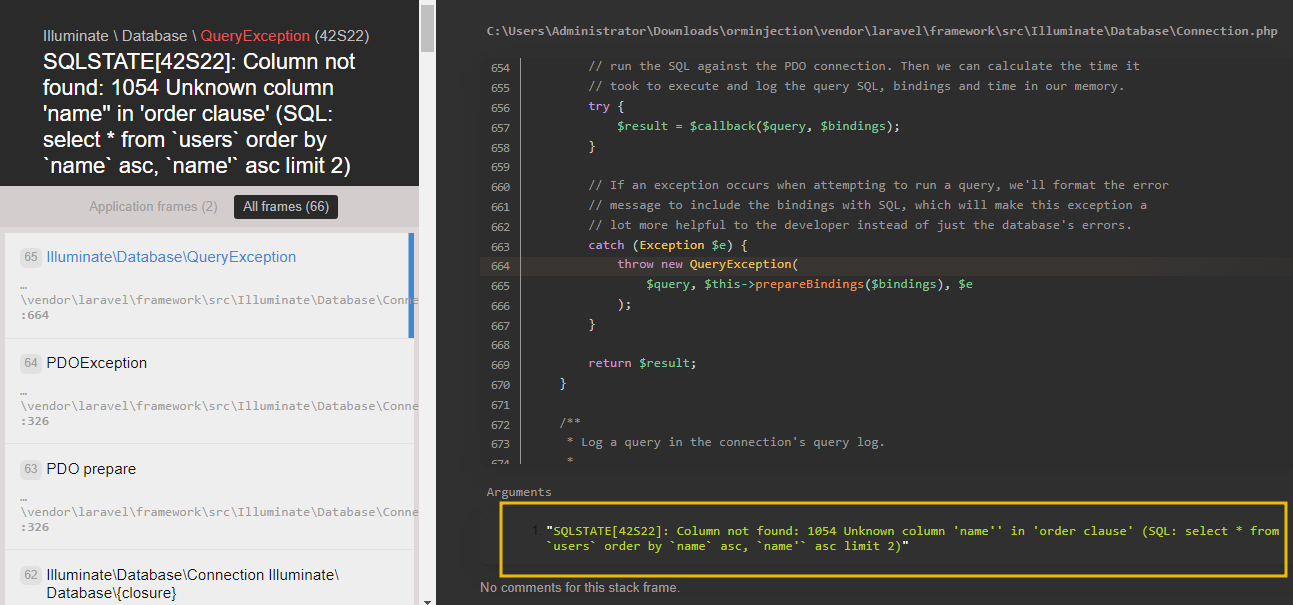
Our objective here is to manipulate the query to retrieve complete data from the users table instead of being restricted to a limited number of rows.
However, injecting the sort parameter in this context is not straightforward by merely concatenating it with the SELECT query and using routine injection methods. The challenge lies in effectively breaking out of the ORDER BY clause to manipulate the query execution. To achieve this, we can utilise a special function: the → operator, which serves as an alias for the json_extract function in MySQL. This operator allows us to navigate JSON data and extract specific values. By using the -> operator in conjunction with the "%27)) payload, we can break out of the ORDER BY clause. The ->"%27)) payload effectively terminates the JSON extraction, bypasses the limitations imposed by the initial query and allows us to append additional SQL commands.
Final Payload
We will prepare the final payload like this:
- Initial query: The initial query that Laravel translates for sorting users by name is
SELECT * FROM users ORDER BY name ASC LIMIT 2. - Breaking the query: By injecting the
name->"%27)), we can cause the query to break and thus create an opportunity to insert our own SQL. - Crafting the payload: To exploit the vulnerability, we craft the payload to break out of the string and inject our SQL. The payload would be something like
name->"%27)) SQL INJECTION QUERY #. Within the parameter valuename->, the->is parsed by Laravel and replaced with JSON MySQL function. On the other hand,"%27))closes the previous string and condition.SQL INJECTION QUERYallows an attacker to write his own query. The character#comments out the rest of the query to prevent syntax errors. - Final result: The payload for getting additional rows from the database would look like https://10-201-49-10.reverse-proxy-us-east-1.tryhackme.com/query_users?sort=name-%3E%22%27))%20LIMIT%2010%23, while the query generated by Laravel to the MySQL database would be
SELECT * FROM `users` ORDER BY json_unquote(json_extract(`name`, '$.""')) LIMIT 10#"')) ASC LIMIT 2including the injected payload. The above query would bypass the limit capability and fetch 10 rows from the table.
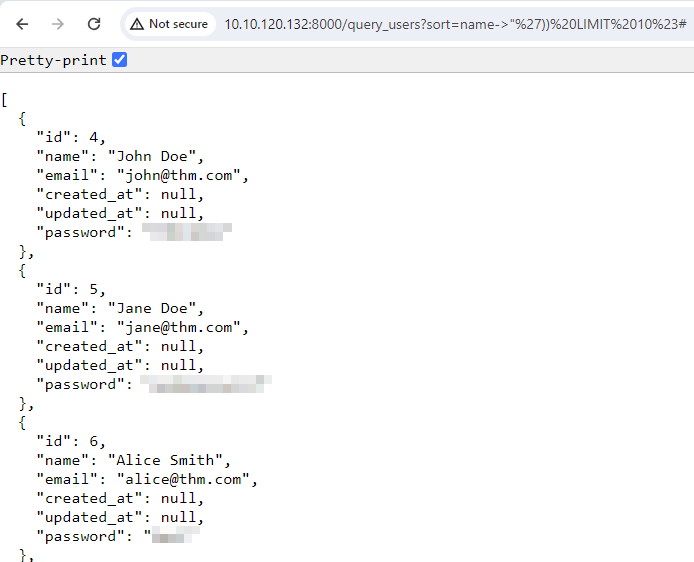
The above example highlights the critical importance of input validation and sanitisation in preventing ORM injection vulnerabilities. By understanding how seemingly harmless query parameters can be exploited, developers can better appreciate the need for secure coding practices. Using ORM features without a proper grasp of their implications can inadvertently expose applications to serious security risks.
Now that we understand the threat surface of ORM injection, preventing these vulnerabilities requires implementing robust security measures and continuously monitoring potential weaknesses. The following sections outline best practices for securing user inputs and leveraging automation techniques to effectively identify and mitigate injection vulnerabilities.
Few Important Practices
- Input validation: Always validate user inputs on both client and server sides. Ensure that the data conforms to the expected format, type, and length. Use regular expressions and built-in validation functions to enforce strong input validation rules.
- Parameterised queries: Use parameterised queries (prepared statements) to interact with the database. This approach ensures that user inputs are treated as data, not executable code. Avoid concatenating user inputs directly into SQL queries.
- ORM usage: Utilise ORM built-in tools to interact with the database. ORMs abstract SQL queries and help prevent SQL injection by handling user inputs securely. Ensure that the ORM is configured correctly and that any custom SQL queries are parameterised.
- Escaping and sanitisation: Escape user inputs to remove any special characters used for injection attacks. Sanitise inputs to remove potentially harmful data before processing or storing it.
- Allowlist input: Implement an allowlist approach for input validation. Only allow specific, expected values and reject everything else. This method is more secure than blocklisting known bad values, which can be incomplete.
Application in Popular Frameworks
We’ll explore essential practices for safeguarding against ORM injection in widely used ORM frameworks. ORM tools like Doctrine (PHP), SQLAlchemy (Python), Hibernate (Java), and Entity Framework (.NET) provide powerful abstractions for database interactions. However, to prevent SQL injection vulnerabilities, it’s crucial to employ secure coding practices such as parameterised queries, named parameters, and ORM-specific techniques. Let’s delve into these best practices with practical examples for each framework:
Doctrine (PHP)
Use prepared statements with parameterised queries to prevent SQL injection attacks.
$query = $entityManager->createQuery('SELECT u FROM User u WHERE u.username = :username'); $query->setParameter('username', $username); $users = $query->getResult();
SQLAlchemy (Python)
Leverage SQLAlchemy’s ORM and Query API to use parameterised queries, which automatically handle escaping and parameter binding.
from sqlalchemy.orm import sessionmaker Session = sessionmaker(bind=engine) session = Session() user = session.query(User).filter_by(username=username).first()
Hibernate (Java)
Use named parameters with Hibernate’s Query API to ensure inputs are adequately bound and escaped.
String hql = "FROM User WHERE username = :username"; Query query = session.createQuery(hql); query.setParameter("username", username); List results = query.list();
Entity Framework (.NET)
Employ parameterised queries in Entity Framework to secure database interactions and mitigate the risk of SQL injection vulnerabilities.
var user = context.Users.FirstOrDefault(u => u.Username == username);
These practices underscore the importance of adopting secure coding practices tailored to each ORM framework, ensuring robust protection against ORM injection vulnerabilities.